During this project I had to face a few issues which if I didn’t fix as soon as possible could have jeopardised my over all success of the project.
Logic Pro
When setting up to record a short musical segment to include in the podcast I faced an issue. After setting up the audio interface and using it as the signal input for the microphone and output for the closed back headphones (Beyerdynamic DT 770 PRO), I noticed no signal was reaching logic and I wasn’t receiving any monitoring output. At first I thought that If I went to Audio settings I could switch it to the correct input but I realised it was already connected. I then went to my MacBook’s settings and ensured that all input and output settings were correctly set up and deleted the BlackHoles that I set up last year (eliminates potential driver conflicts). After this still did not work I checked the I/O buffer size in Logic Pro which still didn’t do anything so I double checked the hardware and discovered that the cable that connected the audio interface to my computer was not rated for high-speed data transfer, I switched cables and this solved the issues I had. If an issue like this was to happen in future I would prioritise checking all hardware before checking for software issues because it’s more likely that issues are due to improper setup than the setting automatically changing on logic.
Final Cut Pro
Being completely new to video editing softwares, I was exited to learn a new software. However, I underestimated the complexity of video editing software. To resolve this issue I watched some YouTube videos on basic use for beginners. One video I found particularly helpful was This video, due to its in-detail beginner friendly format. I found his explanations on file management particularly helpful because it allowed me to keep track of all files that I would want to include in the final edit.
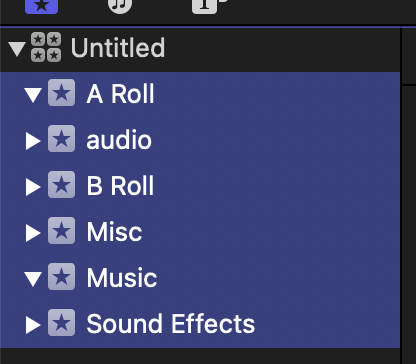
As shown in the above picture I set up different libraries that I could add all different video and audio files that I planned to have in my final podcast. The first time that I used Final Cut Pro I added all my events into the same library which left me very confused when trying to manage my files further on in the process.
Lack Of Structure
Another concern that I had was during the podcast writing phase. From prier research i learnt that poor structure in a podcast can make it sound incoherent, From previous college projects I have had feedback that i sometimes lacked structure in my writing so it was one of my main aims to make sure it flowed well and made sense. From the attached source I learnt that over scripting makes the podcast look “not natural”, but due to the brief I knew the podcast had to be scripted. I tried by best to fix this by writing it in the natural way I normally speak with few exceptions. I also practiced writing the podcast script multiple times to try to find a structure that flowed nicely from point to point.